Spring, 2025
Jewett
Computer Program #3 ATMS 502 / CSE 566
Numerical Fluid Dynamics
Updated - Sun. Mar. 23

Description

  • Problem:  Linear advection, rotational flow, with moving nested grid.
  • Method:   Lax-Wendroff (only), with automatic grid nest placement (but fixed nested grid size)
  • Official program settings: TBA (use test case settings for now - see below)
  • Output: For this program, you are required to use my make-web-pages script(s) to make images and web pages, in addition to the usual "these particular plots" results. See below.
  • Due date: TBA
  • Problem handout: PDF

Takacs Error calculations for Program 3 (and 2)

Some of this was in the program #2 page.
  • I used Takacs' error equations 6.1, 6.6, and 6.7:
    • Total error:
    • Dissipation:
    • Dispersion :
  • For Takacs' equations, I used the sample (biased) variance; remember to take the square root to get the
    standard deviation σ that appears in equations 6.6 and 6.7
    .
  • For the correlation coefficient ρ I used the Pearson formula.

Web pages & shell scripting for Program 3

Creating web pages:
  • Copy (cp) my files on Keeling: cp  ~bjewett/502/Web/*  .  (don't omit the dot at the end of this command!)
    • to Linux, the dot here means: copy those files to my current (".") directory without changing any file names
  • To use these scripts:
    1. Copy those files to your Program3 directory containing a 'gmeta' plot file.
    2. Figure out the first plot frame number (1=first plot, 2=second..) where your plots start following a regular sequence, e.g. truncation error, coarse S1, nest S1 ... then next data time
    3. Edit make_images on Keeling (it is just a text file, so nano or vim works), and change first_plot to refer to that first plot (e.g. skipping IC fields), and change plot_names to whatever you want to call your plot sequence (no spaces allowed in names!)
    4. Run: make_images ... or if the plot file isn't gmeta: make_images name-of-plot-file
    5. Run: make_viewer  zip
    6. Send the .zip file containing plots & .shtml files to your PC, unzip, and open with a browser
      • in some cases it won't open correctly when you just double-click the file ... if that happens, try opening the file directly from your browser with control-O (on a mac, use command key: ⌘-O)
    7. Here is the web page I got from running it on my demo plot file, gmeta_Brian: viewer2p.shtml
  • To navigate/use the resulting web pages:
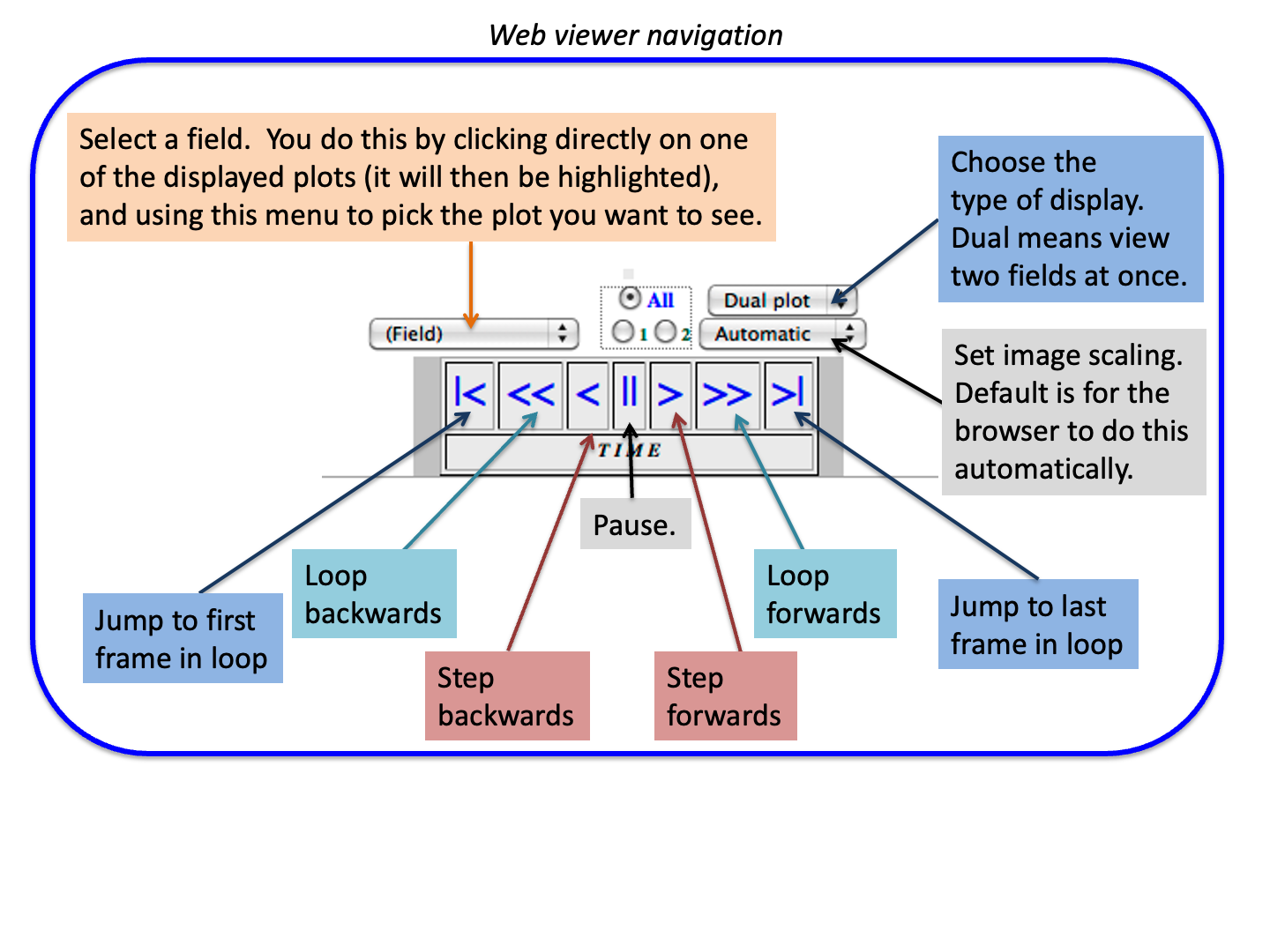
    1. See this: Web viewer explanation image
    2. You can choose to view 2-, 4-, 6- images at once with "Dual plot" menu button
    3. You can choose which plot appears in which image place using the (Field) menu button
Shell scripting:
  • My main Shells + scripting page
  • My latest 'run' script is on Keeling at: ~bjewett/502/Pgm3/run
  • The run script (also also here) has the following sections:
    1. Settings: set your email address here, as well as the name of the running program e.g. pgm3
    2. Deletes old files (to make sure you don't run an old version or view old, outdated plots)
    3. Builds the code with make, and stops if there was a problem.
    4. Runs the program
      • It uses the Linux tee command to both send output to a file, and to your screen.
    5. Plots the results in either or both of two ways:
      • using idt
      • Emailing you the text output plus a zip file of the gmeta file, as .GIFs
    6. It would be easy to add the 'build web pages' steps here too.

Nesting and plot routines for Program #3

The following are provided to you.  They are available
  • on Keeling in  ~bjewett/502/Pgm3/C or ~bjewett/502/Pgm3/Fortran
  • demo dointerp code compile instructions: C programmers / Fortran
dointerp handles interpolation between the coarse and nested grids; feedback; and nested grid boundary conditions
nestwind provides the nested grid analytical wind field, given the nest location in coarse grid coordinates
test_interp a short program showing you how to call dointerp to set BCs, create a "nest", and do feedback.
README -- describes how to compile the test_interp program.

How to get program 3 started/working!

  1. Make a copy of your directory for program 2 (e.g.: cp -R   pgm2   pgm3)
  2. In your main program, you will need some extra nesting variables - see below.
  3. Place the nest using the initial condition field:
    1. Make sure your grid parameters correspond to the program 3 test case! (farther down on this page)
    2. After calling IC() and plotting the (coarse grid) initial conditions (s1, u, and v):
    3. Call your routine to compute the truncation error (TE). Until everything is working, I suggest also calling contr() to plot the TE array.
    4. Once you have the TE computed, compute the grid-point-flagging criteria (half the TE array max value)
    5. Find the left-right-bottom-top edges of the "more than criteria" region, then average to find the center location of the nest. Print out this nest center location.
    6. Find the left-right-bottom-top edges of the NEST - not to be confused with the edges of the truncation error points. Remember in our case the nest could be smaller or larger than the region of large truncation error. To find the nest edges, I:
      • Compute nestsize = (nx-1)/refinement_ratio
      • nestX1 = nest_x_center - nestsize/2
      • nestX2 = nestX1 + nestsize
      • nestY1 = nest_y_center - nestsize/2
      • nestY2 = nestY1 + nestsize
    7. Make sure your nest location doesn't run off an edge of the coarse grid --- this means:
      • In Fortran, that nestX1 >= 1 and nestX2 <= nx and nestY1 >= 1 and nestY2 <= ny (in C, use i1,i2,j1,j2)
      • If for example it is crossing the top edge of the domain, then nestY2 is > ny. Fix by setting nestY2 = ny, and nestY1 = nestY2 - nestsize
    8. call dointerp to place the nest (fill up s1nest values from s1coarse grid)
    9. call contr to draw contours for your nested grid array that dointerp filled in with interpolated coarse-grid values.
      If the nest is centered and called OK, you'll see a "cone" at the nest center - and appearing much larger than on the coarse grid.
    10. call contr to draw contours for your coarse grid again, but this time with the nested grid coordinates (instead of 0,0,0,0) in the call to contr(). You should see your coarse grid cone, with the nested grid boundaries shown in red.
    11. call nestwind to fill up the unest and vnest arrays - and plot u(nest) and v(nest), too.
    12. call the close-ncar-graphics routines at the bottom of the code and stop (in C, exit(0)). Focus on getting the nest position OK before going any farther!
  4. Add nest-movement code at the start of (but inside) your main time-step loop:
    1. If the time step is a multiple of the required interval (test case: every 5 steps) ...
      • If you haven't already, save your nestX1, nestX2, ... in old-nest variables (e.g. nestX1old)
      • Call your TE routine to find the new nest center
      • Compute the new nest edges: nestX1, nestX2, ... etc.
      • Move the nest from the old to new location by calling dointerp()
      • Update the unest, vnest arrays by calling nestwind()
  5. Continue your steps inside the main time step loop:
    • call bc (for the coarse grid)
    • call dointerp (to set BCs for the nested grid)
    • call advection (for the coarse grid)
    • Inside a new loop: call advection for the nest multiple times
  6. Perform feedback by calling dointerp (only if feedback is turned on!)

Calling dointerp:

See the test_interp routine in the Fortran or C directory for examples of how to call dointerp and nestwind.
In Fortran, you call dointerp routine in this way:

call dointerp(q1, q1nest, nx,ny, bcwidth, nestX1, nestX2, nestY1, nestY2
          n,ratio,flag, nestX1old, nestX2old, nestY1old, nestY2old)

Variables:
  • q1             - name of the coarse grid.  Pass the whole array - including ghost points - to dointerp.
  • q1nest       - name of the nested grid.  Pass the whole array - including ghost points - to dointerp.
  • nx,ny        - dimensions of the grid (not including ghost points for Fortran) (so this really IS just nx,ny)
  • bcwidth    - number of ghost points you are using.
  • nestX1 ... nestY2 - four integers defining the nest position -
      • IF you are first placing the nest OR you are setting nest BCs OR you are doing feedback,
        then these four integer variables define the current position of the nest on the coarse grid ...
        and the variables nestX1old,nestX2old,nestY1old,nestY2old are ignored by dointerp.
      • IF you are moving the nest, these are the (future) coordinates of where the nest should be moved, and
        nestX1old,nestX2old etc. define the current position of the nest on the coarse grid.
  • n               - the time step counter, used by print statements inside the routine.  Pass 0 if you wish.  This is an integer.
  • ratio         - nest refinement factor, an integer such as 3
  • flag           - a key variable (an integer) telling dointerp what to do.
      • when flag =  -1, dointerp will move the nest, from old (nestX1old, etc.) to new (nestX1, etc) positions
      • when flag =   1, dointerp will place the nest: interpolate coarse > nest.  We do this only once.
      • when flag = 10, dointerp will set nested grid boundary values.  Nest interior values are unchanged.
      • when flag =   2, dointerp will do feedback - to the coarse grid from the nest.
  • nestX1old...nestY2old are ignored except in the case when the nest is being moved.  
      • When the nest is being moved, nestX1old ... nestY2old are the current (soon to be old!) position of the nest,
        and the variables nestX1 ... nestY2 contain the new nest position you want.
      • When calling dointerp for cases other than moving the nest, just pass 0,0,0,0 for these four variables.

Rotational flow test case results:

Settings for test case:
  • 106x106 grid
  • Domain [-0.5, +0.5] as before
  • Cone width is 0.075
  • Nest time/space refinement ratio = 3
  • Nest moved every 5 time steps
  • Run 360 steps; Time step = pi / 360

Results for test case:
These plots use my simulation viewer web pages - click for instructions on using pages

Initial condition No feedback With feedback
First 40 steps, only plots, text plots (2-panel), plots (8-panel), text
Full rotation plots, text plots (2-panel), plots (8-panel), text

Frequently asked Questions & Answers -  check back for updates

  1. [How does the program know the old coordinates of the nest when moving it?]

              Well you need 8 variables:
                   Four to hold the prior nest position: nestX1old, nestX2old, nestY1old, nestY2old
                   Four to hold the new nest position:  nestX1, nestX2, nestY1, nestY2
              You normally need only concern yourself with the latter four.  You determine them from the truncation error and pass them
                   to dointerp to place the nest or when setting nest BCs or when doing feedback.
              But:  when Moving the nest your sequence looks like:
                 1) in your main program: copy current nest position to "old" variables:  nestX1old=nestX1, nestX2old=nestX2, etc
                 2) compute the new nest position (nestX1,nestX2...) based on truncation error and nest size on the coarse grid as usual
                 3) call dointerp to move the nest - passing the new (desired) nest coordinates as well as the old (current) nest position.

             Those four variables (nestX1old ... etc) are ignored in any other dointerp call - setting nest BC, placing nest, doing feedback.
     

    =================================== Older questions follow ================================

  2. [How to handle integration of the nest vs. the coarse grid]

              I suggest you make TWO changes to handle nest vs. coarse grid advection.
              A) pass a flag to the advection routine letting it know whether this is the coarse or nested grid.
                   In advection, only update the 2d array (say, "q1(i,j)") for i=2:nx-1 for the nest; 1:nx for the coarse grid.
              B) advection  passes this flag in the call to your advect1d routine.  advect1d uses it to either update 1:nx or 2:nx-1
                   depending whether this is a coarse or nested grid.  An easy way to do this is make your loops run from istart to iend,
                   and set these to 1 and nx for the coarse grid, and 2 and nx-1 for the nest.
              Problems can occur if advect1d tries to access ghost points on the nest that you have not set.


  3. My maximum cone value is not equal to 10 in the initial condition.  Why?

             
    Because the hand-in case dimensions (100x100 - this was a previous year's assignment) does not allow the cone center to fall directly
              on a grid point.  Often having the grid dimensions be odd is sufficient, but not necessarily.

              You can tell for sure by computing the i,j location of the cone center.  For example, if the domain is 101x101, the (i,j)
              cone center location is (x_cone-x_left)/(x_right-x_left)*(nx-1) +1, (y_cone-y_bottom)/(y_top-y_bottom)*(ny-1) +1 ),
              [the +1 refers to fortran; omit in C], or (51,81).  With a domain of (100,100), this puts the center at (50.5,80.2) such that
              the maximum value of 10.0 will not land on a grid point.  Thus the sampled max at T=0 is no longer 10.

  4. Is the program Valgrind available on [Keeling]?  It is very useful for detecting memory leaks in C/C++ programs.

             
    Yes.  Apparently it can also be used for Fortran (compiled) programs.  For more information, see the valgrid home page.
              To use it with your program, see this page.  I believe you'll need to compile with -g -traceback for it to identify variable names
              and code lines.  For information on available versions on Stampede, TACC consultants say to type module spider valgrind .
              To use it, type module load valgrind/3.8.1


  5. What does it mean to (and how do we) 'follow the cone around' in order to test the dointerp() routine?

             
    Do this prior to implementing the full-blown nest placement criteria.  On each time step, find out where the cone maximum is located
              (look inside contr.f90 or contr.c for examples of how to do this).  Then use that (i,j) center point to figure out the nest placement.
              For example, suppose (icenter, jcenter) is where you want the find the cone maximum.  Then the nest location on the coarse grid
              can be found by:

             
        nestsize = (nx-1)/ratio
                  nestX1 = icenter - nestsize/2
                  nestX2 = nestX1 + nestsize
                  (and do the same for Y)

              Once you know the grid edge positions, call dointerp every time step, telling it (for testing purposes only, here) to place the nest
              as if it is the first time you are doing so.  Then call contr for the coarse grid (supplying the nest grid edge positions, so it draws
              the nest position on the coarse grid plot) and then call contr for the nest.   If this all works and looks reasonable, move on to
              finding the nest position from the truncation error.  If that all works, proceed to adding a nest time step loop and actually integrating
              the solution on the nest, with feedback to the coarse grid.


  6. How are the nest boundary condition values determined?

             
    The dointerp routine provides them.  You need only set the correct option "flag" to 10, and the nest location on the coarse grid.

  7. How do I have my integration routine only update interior points for the nest?

             
    Here is a simple, if not particularly elegant, way to do it: just choose to copy to the 2-D array for only 2:nx-1 (in Fortran, for the nest).
              That is...
              Pass some flag to your advection routine to tell it whether you are working on the nest or coarse grid.  Then: leave most of the code
              in advection unchanged.  The change is needed when you are copying back from new 1-d array values to the 2d array after a call to
              your 1-d advection routine.  So your x-advection pass looks like:


                   loop: copy 1d row of q1(i,j) values to q1d(i)
                   loop: copy 1d row of u(i,j) values to vel1d(i)
                   call advect1d(q1d,vel1d,.....,q1new)           (q1new is what I called the array with new 1d values)
                   (here is the new part:)
                   if (this is the coarse grid) then
                        loop: copy q1new(i) to q1(i,j) for i=1,nx

                   else (this is the nest)
                        loop: copy q1new(i) to q1(i,j) for i=2,nx-1
                   endif

               in this way you copy - update - the entire 2d scalar array row if it is the coarse grid, but only 2...nx-1 if it is the nest.

  8. [Simple approach for determining the truncation error region bounds?]

    Here is the procedure I use for determining the left and right bounds of the region 'needing' refinement, based on truncation error -

    * set ileft = 0, iright=0
    * I loop over all "i" values for which I have truncation error estimates (3 to nx-2)

         * Inside that: I loop over all "j" values (similar to above: 3 to ny-2), and compute the max truncation error for that "i" column
         * if the max truncation error is >= 50% of the overall domain max, then:
              > if ileft = 0, set ileft to "i".
              > set iright = i
           endif
    end-i-loop

    So with ileft initially zero, it gets set the first time any column has a truncation error over the threshold.

    Once ileft is nonzero it won't be set again, so it gets set only for the FIRST (left-most) column meeting this criteria.
    iright is set over and over and will be set the last time there is a column for which the criteria is met - so it ends up
    being the LAST (right-most) column.


  9. What contour interval is being used in the cone plots above?

             
    The contour interval is 0.5 (for both coarse and nested grids)

  10. [How to implement double-cone initial condition?] [extra credit only]

    You will add a few lines within your initial condition routine, so that it will now look like:

    do (each j)
       do (each i)
           (compute distance from this grid point to first cone)
           (if dist <= radius of cone, then ... set scalar array q(i,j) as you have done in prior programs)
           (compute distance from this grid point to second cone)
           (if dist <= radius of cone, then: q(i,j) = q(i,j) + (formula for 2nd cone, same as first)
       enddo
    enddo

    It is key that the second cone specification add to the first.   

  11. What dimensions should be used for the nest arrays?

    I have dimensioned my array sizes for the nest -- wind and scalar arrays - the same as for the coarse grid. 
    This makes it easy to use the same advection routine.

  12. How should we have the advection routine only work on interior grid points for the nest vs. that done for the coarse grid?

    (See above) This is up to you but I choose to leave my advection code alone other than the final step (for X, or Y, advection) in which the 1d "q1dnew" array is copied back into the 2-D array.  If the coarse grid is being integrated, I copy all of i=1,...,nx to the 2D array (for x advection pass); if it is the nest, I copy only i=2,...,nx-1.

  13. Is the nest first placed (initialized) after the first coarse grid time step?

    No; it is done at the top (beginning) of the coarse grid time step loop, so effectively you are computing truncation error
    from the initial condition when you first place (initialize) the nested grid.

  14. What is the relationship between the Takacs error statistics and the truncation error computation for the nest?

             
    The two are unrelated.  We compute Takacs error stats only for the coarse grid in the rotational case and only at the end of the integration.

  15. [Question regarding ghost points vs. boundary conditions for the nest]

              
    I unfortunately changed notation somewhat in this program.  The boundary conditions are unchanged for the coarse grid. 
              For the nest, we are only updating/integrating 2...nx-1 and 2...ny-1, so the ghost points (i=0, i=nx+1, j=0, j=ny+1) are, effectively,
              unused; we set the border points for the nest at nest edges i=1, and i=nx, and j=1, and j=ny.  If you also set ghost points for the nest
              it does no harm, but they won't be really used in the integration for the interior points with Lax-Wendroff.

  16. Do we call the advection routine for the nest every 5 coarse grid time steps?

    No - the 'every 5 time steps' issue applies only to how often we move the nest in the rotational case.  On n=5,10,... compute the truncation error and determine the new nest location, and call dointerp to move the nest for you.  Independent of how often the nest is moved (if at all), we have a time step loop for the nest which lies within the overall coarse grid time step loop.  So on every coarse grid step, we make multiple nested grid time steps and thus calls to advection for the nest (there are 3 nest steps for each coarse step, if we are using 3:1 nesting ratio).

  17. [Received a runtime error (after compiled in Fortran with -check all) in the dointerp routine...]

    It turned out the nest ratio was incorrect, making the nest too large (same grid-point dimension but physical size too large), and the nest crossed beyond one of the coarse grid boundaries.  This caused a subscript error when dointerp tried to copy data beyond the array bounds.

  18. [Having problems adapting their code to work for either dimensions for rotational flow or deformational flow] [extra credit only]

    It was not my intention that you make your code flexible enough to swap from one domain size to the other without recompiling.  Put another way, it is OK to hard-code the array dimensions at the top of your main program as you have done before, and just change from one case settings to another and recompile when changing from rotational to deformational flow

    FYI, there are ways in C and Fortran to handle variable dimensions.  In Fortran, you can create variable-dimensioned arrays for which you define/decide on its size after you decide on nx,ny -- using the allocate statement (see Chapter 10 Arrays 2: Further Examples, section 10.1, page 120, in this Fortran textbook).  In C, you can use malloc (here is one reference) to allocate memory for a variable, array, or data structure.

    This is all well and good, but unnecessary here.  Just hard-code the array dimensions.  I'd rather you spend your time getting nesting working than getting variable-dimensioned arrays into your code for that extra bit of flexibility.  If you'd like to know more about how to do the latter, let me know, and I'll be glad to work with you.


  19. [Having problems with nest boundaries]

    Make sure you are consistent when indexing your nest (and coarse..) arrays, particularly in C.  If you are dimensioning arrays with ghost points, beware of places where you may change to instead dimension and reference the arrays without ghost points.  For example, in C, if your array is snest[NXDIM][NYDIM], make sure you are using I1...I2 and J1...J2 rather than 1...NX (or 0...NX-1), etc.  Be aware of routines expecting arrays referenced as 1...nx rather than -2:nx+1 (for example).

  20. [Problems with nest wind fields]

    Check to see that your nested grid arrays are dimensioned the same as those of your coarse grid.  If the coarse grid U field is u[NXDIM+1][NYDIM], then the nest array unest should be dimensioned the same (provided your integration routine is expecting the same dimensions for coarse and nested grids, as it should.

  21. I am stuck with the boundary conditions for nested grid. What do you mean the time-interpolated boundary conditions? How to realize it in the program?  I read the dointerp.f and found there is a part dealing with the interpolation from coarse grids to nest grids when flag = 1 (for nest initialization). It seems we have considered the boundary conditions for nest grids.

    This is from a previous course year.  In our class, we'll just call the dointerp routine to set the nest boundary conditions.

    Here is the recommended way to develop boundary condition code for the nest:


    1) initially just interpolate the (time step n) coarse grid points to the edges of the nested grid at the start of the nested grid time interpolation loop (e.g. 3 nested grid time steps for 3:1 nesting, for each 1 coarse grid time step), and leave the boundaries for the nest fixed from (n)...(n+1) on the coarse grid.

    2) when your code works with the above (1) in place, add time interpolation.  Now you also interpolate those coarse-grid coordinates in time between time (n) on the coarse grid and time (n+1) on the coarse grid.


